Moment Code Highlights
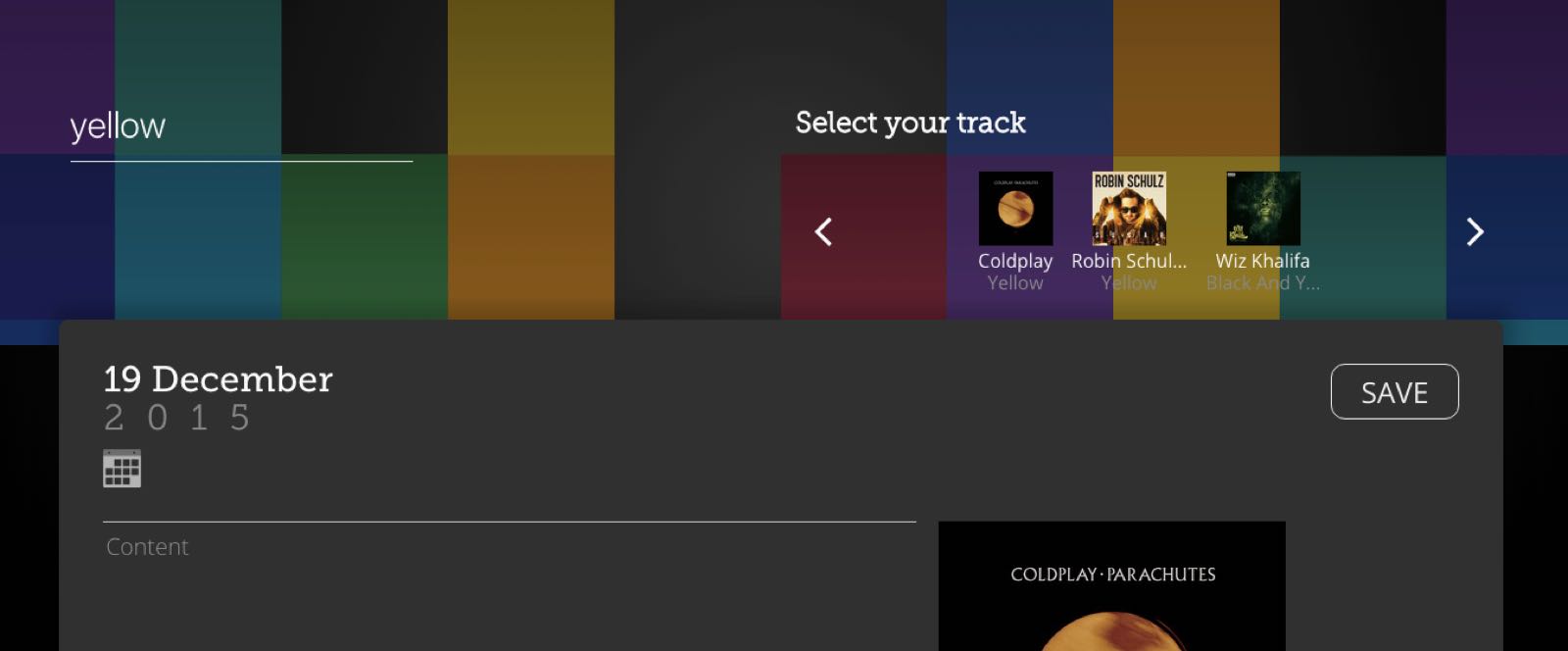
I contribute regularly to Moment Music App. It is an app where users can build their music collection based on special moments with music.
Here is a short list of code and design that I contributed to this project
- Wireframes in order to build our style guide
- Design: SVGs calendar, arrows, background, and more
- CSS: Various form components
- CSS: Layout for search results
- JavaScript: Search, Dates, and Pagination functionality
- HTML: Timeline View
There are way too many pieces of code for me to list, so I'd like to mention a couple other snippets in greater detail below.
Spotify Search
The first area of the app I would like to highlight is the Spotify search. This function is a part of the Add or Edit A Moment view. Since we develop the app with AngularJS, I created an Angular Service to perform the actual searching:
module.exports = function(app) {
  app.service('SpotifySearchService', ['$http', function($http) {
    var urlRoot = 'https://api.spotify.com/v1/search?q=';

    var searchSpotify = {
      getTrack: function(q) {
        if (angular.isDefined(q)) {
          return $http.get(urlRoot + 'track:' + q + '&type=track');
        }
      },
      getAlbums: function(q) {
        if (angular.isDefined(q)) {
          return $http.get(urlRoot + 'year:' + q + '&type=album');
        }
      }
    };

    return searchSpotify;
  }]);
};
Breaking this code down:
- I created a title for the service “SpotifySearchService”
- I added the
$httpservice as a dependency - Then I created two methods that take a parameter
qand concatenate it into the Spotify search query endpoint (one for albums and one for tracks)
I utilized this service in the Angular controller for the “Create a Moment” page. To do that I added the service as a dependency and then created a function that uses the getTrack method and on success adds the track data from the response to a results property on the scope.
function searchSpotify(q) {
  SpotifySearchService.getTrack(q).then(successHandler, errorHandler);
  function successHandler(response) {
    vm.results = response.data.tracks.items;
  }

  function errorHandler(response) {
    $log.error('Error', response);
   }
}
The only thing left to make this functionality happen was to add it to the view. I plugged the controller’s search() method into an ng-submit directive, which binds the expression to the user clicking submit (or pressing “enter”).
<form data-ng-submit="vm.search(search)">
  <input class="search-heavy" type="text" data-ng-model="search" name="search" placeholder="Search"/>
</form>
Search Pagination
Another cool bit of code on this same page is the pagination for flipping through the search results. Notice in the code below the two anchor elements. Clicking on these links runs a prevPage() and nextPage() method to bring either the next three or previous three search results into view.
<h2>Select your track</h2>
<div class="results-nav">
  <a class="icon-arrowL" data-ng-click="vm.pagination.prevPage()"></a>
    <ul>
      <li data-ng-click="vm.addTrack(result)" data-ng-repeat="result in vm.results | pager:vm.pagination">
        <figure>
            <img data-ng-src="{{ result.album.images[2].url }}" alt="{{ result.name }} by {{ result.artists[0].name }}" title="{{ result.name }}" >
          <figcaption>
            <p>{{ result.artists[0].name | limitTo: 11}}{{ result.artists[0].name.length > 11 ? '...' : '' }}</p>
            <p><span>{{ result.name | limitTo: 11}}{{ result.name.length > 11 ? '...' : '' }}</span></p>
         </figcaption>
        </figure>
      </li>
    </ul>
  <a class="icon-arrowR" data-ng-click="vm.pagination.nextPage()"></a>
</div>
The key to making the pagination happen is the pager filter. This filter is a basic Angular filter that takes the results, slices them up with “offset” and “limitTo” filters.
angular.module("momentApp").filter("pager", function ($filter) {
  return function (results, pagerObj) {
    var filteredResults;
    filteredResults = $filter("offset")(results, pagerObj.getOffset());
    filteredResults = $filter("limitTo")(filteredResults, pagerObj.perPage);
    return filteredResults;
  };
});
The last piece of the puzzle is constructing the pagination object that contains the methods for the ng-click events and how the offset will render. Another cool thing to check out is that the user will see either 2 or 3 results depending on the size of the browser window. How responsive!
vm.pagination = {
      currentPage: 0,
      perPage: (window.innerWidth > 320 ? 3 : 2),
      getOffset: function () {
        return vm.pagination.currentPage * vm.pagination.perPage;
      },
      prevPage: function () {
        if (vm.pagination.currentPage > 0)
          vm.pagination.currentPage--;
      },
      nextPage: function () {
        if (vm.pagination.currentPage + 1 <= (Math.floor(vm.results.length / vm.pagination.perPage)))
          vm.pagination.currentPage++;
    }
};
2-dimensional Month Array
There is a lot of cool code in our moments.ctrl.js controller–the main controller for the home screen. One bit I would like to highlight: I took a single array of “moment” objects and pushed them into a new array sorted by month. The code looks like this:
var monthChecker = [];
var monthChunk = function(index1, index2) {
  return vm.moments.slice(monthChecker.indexOf(index1), index2);
};
for (i = 0; i < vm.moments.length; i++) {
  var createDate = new Date(vm.moments[i].dateModified);
  var month = createDate.getMonth();
  monthChecker.push(month);
  if (i === 0 && vm.moments.length === 1) {
    vm.months.push(vm.moments.slice(0));
  } else if (i !== 0) {
    if (month !== monthChecker[i - 1] && i !== vm.moments.length - 1) {
      vm.months.push(monthChunk(monthChecker[i - 1], i));
     } else if (month !== monthChecker[i - 1] && i === vm.moments.length - 1) {
       vm.months.push(monthChunk(monthChecker[i - 1], i));
       vm.months.push(monthChunk(month));
     } else if (i === vm.moments.length - 1) {
       vm.months.push(monthChunk(month));
     }
   }
 }
 vm.months.reverse();
What I enjoy about showing this code is that there are a ton of different ways to get the same result/solution (sorting the user's moments by date). For example, you could accomplish this in MongoDB (the database). But I like this solution because it's creative and the code reads fairly straight forward. What I am doing is looping through the array of a user’s moments and pushing them to an empty array every time that they are of a different value from the getMonth() method. Cool!
There are a number of issues currently set up for Moment Music App including performance enhancements, sharing integration, and visual changes. Feel free to check it all out on GitHub.